How AudioMap 2 sets up, aligns and corrects a sound system
Contents
- The example used throughout
- 1. Setting up: finding the speakers
- What happens
- The signals
- Timing the arrival
- Removing the interface latency
- Two readings of every distance
- Solving the layout
- Which way round
- What the coverage area is for
- In the example
- 2. Measuring: captures you can trust
- What happens
- The live transfer function
- Resolution
- Sweeps
- Smoothing
- What excess phase shows
- 3. Aligning: delay, polarity and crossovers
- What happens
- What alignment optimises
- Several positions
- Finding candidate delays
- Subs and the cycle question
- Where the crossover goes
- In the example
- 4. Correcting: fitting the EQ
- What happens
- How the EQ is fitted
- Respecting the crossovers
- Positions and groups
- The target
- In the example
- 5. Playing the correction: modes and where they run
- Which correction mode
- How the FIR modes are built
- Where it plays
- 6. Reading the room: reflections, surfaces and acoustics
- What happens
- Finding reflections
- Placing the surfaces
- Absorption
- Reverberation and clarity
- 7. Predicting coverage: the heatmap
- What happens
- How it works
- Blending towards the measurements
- The example, end to end
AudioMap 1 measured your system. AudioMap 2 takes you the rest of the way: it guides you from speakers in a room to an aligned, corrected system, and plays that correction on everything you listen to. It works the same way for a desk pair, a living room, a studio or a PA.
This article takes each stage in turn: what it does, how it works, why it works that way, where it stops, and what it did on one real sound system. It is written for engineers who want to know which methods sit behind each step and where AudioMap leaves the decision to you. Standard methods are named so you can look them up. AudioMap's own tuning is described in full, in words: what each rule is for and what it trades off, without the exact values.
AudioMap 2 requires macOS 13 or later on a Mac with Apple silicon, and a Windows version is in active testing. What each edition includes is on the pricing page.
The example used throughout
Each section ends with what AudioMap did on one near-field desk system, measured in the setup wizard and saved as a project:
| Unit | Speakers | High-pass | Low-pass |
|---|---|---|---|
| Monitors | 2 studio monitors | 117.7 Hz | none |
| Mains | 2 two-and-a-half-way speakers | 68.8 Hz | none |
| Sub | 1 sub | none | 68.8 Hz |
It was measured at 10 microphone positions around the listening position, with sweeps at 48 kHz. The figures are what AudioMap itself logged and drew when it reopened that project; they weren't recomputed by hand. A summary of the whole example is at the end.
1. Setting up: finding the speakers
What happens
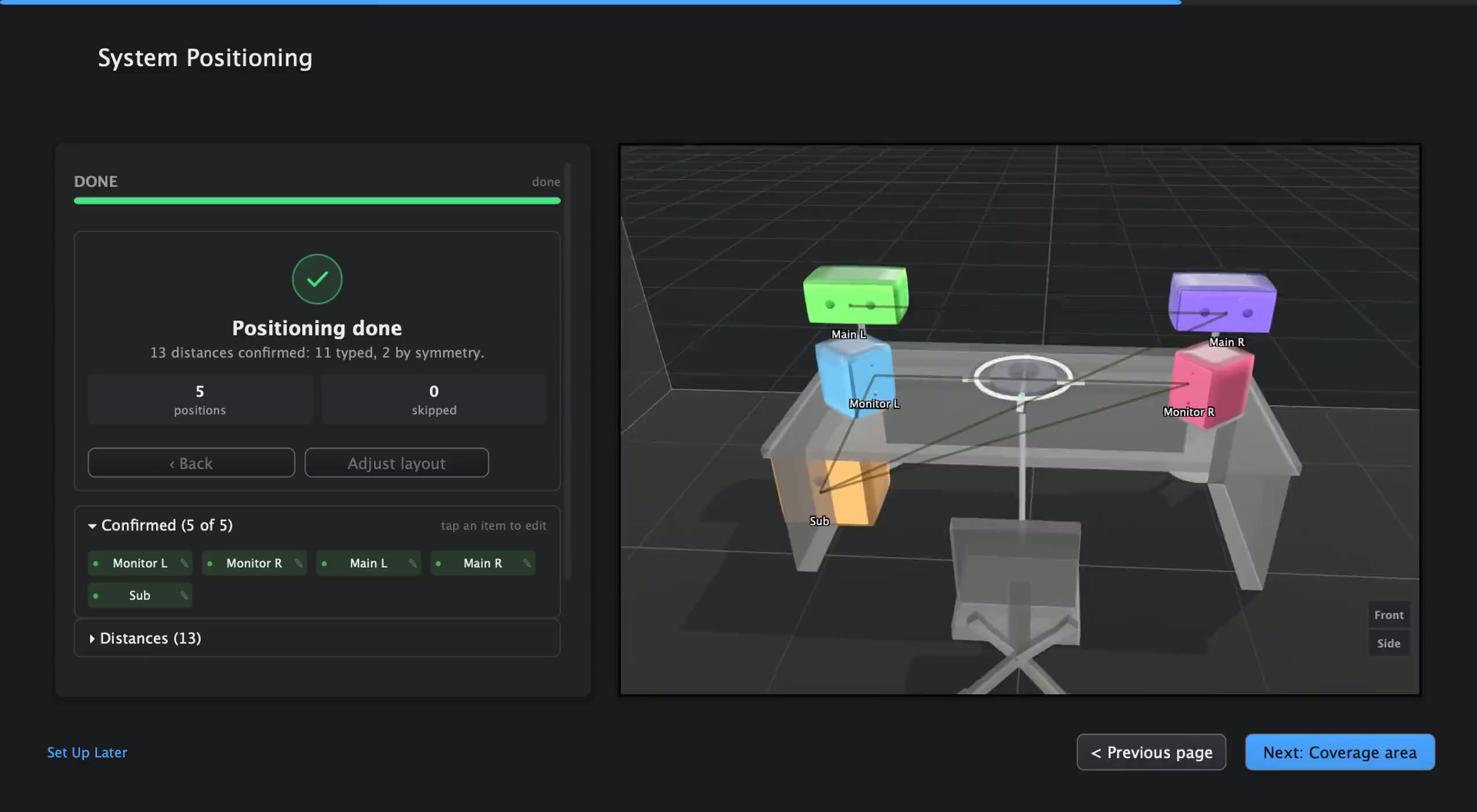
The setup wizard takes you from a connected audio interface to a sound system AudioMap understands. You start from a preset close to what you have, anything from a home hi-fi to a festival PA. A preset gives AudioMap a head start: named, grouped speakers in roughly the right places, and a 3D model of the space with its furniture. The closer the starting point, the fewer questions AudioMap needs to ask. Your own layouts can be saved and used as the starting point for the next job.
No loopback cable is needed: AudioMap uses a virtual reference by default. If you prefer a hardware reference, cable an output back to an input and add it as a reference wire.
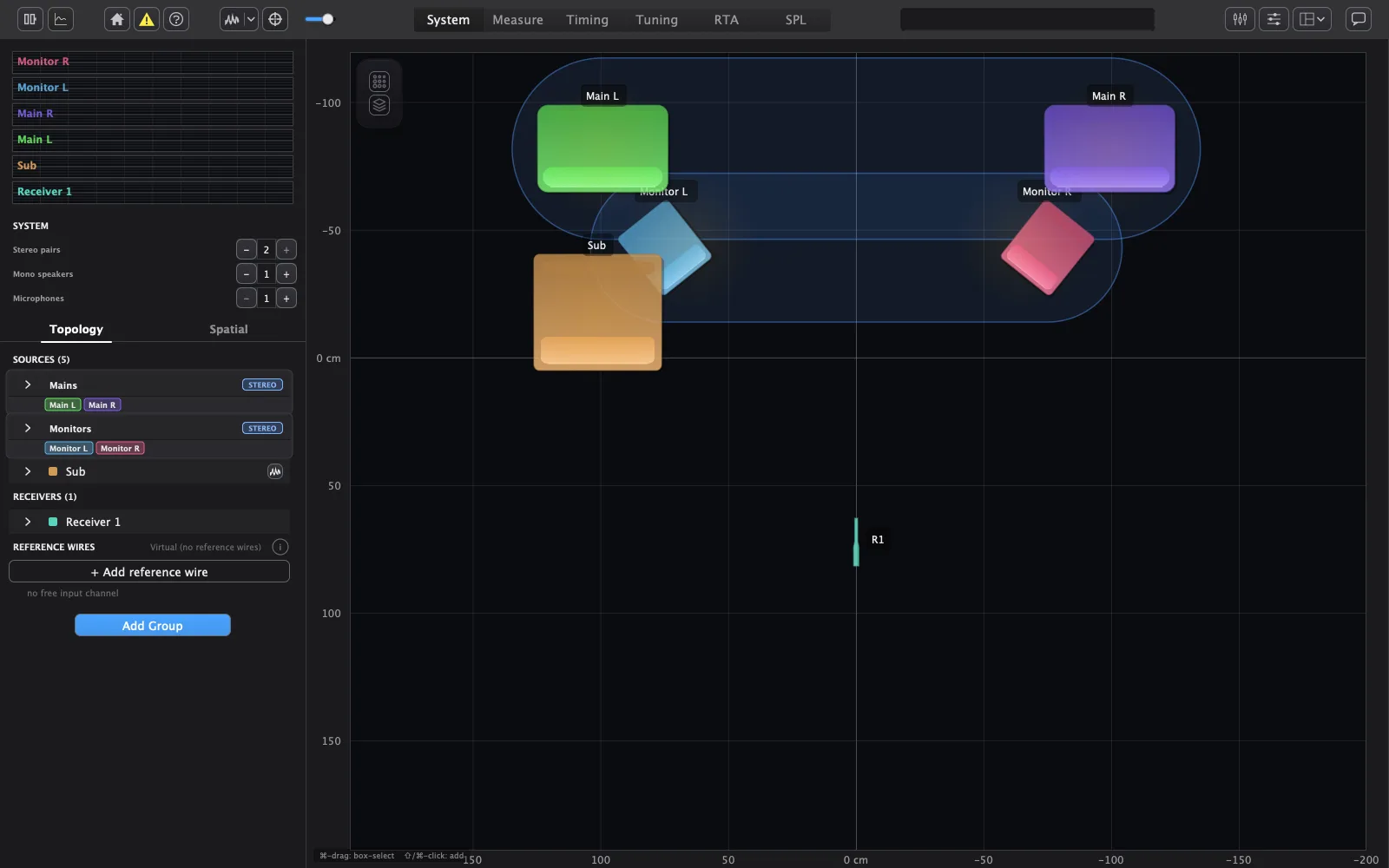
AudioMap then plays a short signal through each speaker, times its arrival at the microphone, and works out the distances between your speakers. From those distances it solves the speaker positions in plan, using the heights you enter, and asks you to confirm a few heights and distances, prefilled with what it measured. Check any you doubt with a tape measure; where the two disagree, you decide which to keep.
The signals
Timing needs a sharp correlation peak, and a sharp peak needs a short, broadband stimulus. So each full-range speaker plays a brief exponential sweep across most of the audio band, repeated with short gaps so several passes can be compared.
Not every speaker covers that band. A mid or high driver played a full-range sweep wastes most of it, and a sub can't reproduce it at all. So band-limited speakers get a stimulus matched to their own band, and their arrival is judged only inside that band, where they actually produce sound. Subs get their own longer low-frequency sweep and a longer analysis block, because a low band needs more time to hold enough frequency resolution to say anything.
The trade-off is between sharpness and signal. A wider band gives a sharper peak; a band the speaker can't reproduce adds only noise. Matching the stimulus and the scoring band to the speaker keeps the peak as sharp as that speaker allows. The sub's sweep length was chosen from reasoning about the band rather than from field measurement, so it's still provisional.
Timing the arrival
AudioMap measures each arrival by generalised cross-correlation with phase transform (GCC-PHAT) between the reference and the microphone.
- Why PHAT. A plain cross-correlation is coloured by the speaker's tonal balance and the room: a bass-heavy speaker in a boomy room gives a broad, rounded peak that's hard to place. PHAT whitens the cross-spectrum, keeping only phase, so the peak is sharp whatever the speaker or room sounds like. The cost is that PHAT also amplifies frequencies with little energy, which is why the band a speaker can't reproduce is removed inside the weighting itself rather than by filtering the signal first: a filter would smear the very peak it's meant to clean up.
- Confidence. The peak is only trusted when it stands clearly above the rest of the correlation. A pass that doesn't is thrown away rather than averaged in, because one wrong peak averaged with good ones gives a confidently wrong answer.
- Below one sample. The peak is interpolated from its neighbours, so the arrival is timed to a fraction of a sample. At 48 kHz one sample is 0.715 cm of air path, so timing resolution is not what limits distance accuracy; geometry and reflections are.
- Several passes. AudioMap takes the median of several recent passes rather than the mean, so a single bad pass, a cough or a door, can't drag the result.
- Weak signals. When no single pass is strong enough to lock, the passes are summed coherently first. Uncorrelated noise partly cancels in that sum while the repeated stimulus adds up, so a quiet speaker in a noisy room can still be timed.
Removing the interface latency
Every audio interface adds a round-trip latency, and it varies between interfaces, drivers and buffer sizes. Left in, it would add the same error to every distance.
So you hold the microphone just in front of each speaker's grille in turn. At that distance, a speaker's own arrival is almost pure system latency. Every row of measurements taken with the mic at one speaker is then referenced to that speaker's own arrival, and the latency appears on both sides and cancels exactly, whatever it is. A small allowance restores the gap between the mic and the grille.
The same self-arrivals give AudioMap a robust estimate of the latency itself, for everything else that needs it. Readings that are implausibly early are discarded, because an early reading is far more often an error than a real effect, and the estimate is trusted only once several speakers agree. If one speaker's self-arrival never locks, the others' estimate stands in for it, and the distances from that position are trusted less in the solve.
The speed of sound is taken as 343 m/s, without temperature correction.
Two readings of every distance
Every pair is measured twice, once with the mic at each end. When the two readings agree, they're combined, the stronger reading counting for more. When they don't, AudioMap doesn't split the difference, because the average of a right and a wrong reading is just a different wrong reading. It resolves the disagreement physically:
- A reflection always travels further than the direct path. So when the readings disagree and the shorter one is trustworthy, the longer one is the likelier error: it probably locked onto a wall bounce.
- A much stronger reading is more believable than a weak one. A reading with far more signal behind it wins over a marginal one.
- When neither rule settles it, the pair is set aside and rebuilt from the other distances, or kept with low confidence so it can't distort the layout.
Then the whole set is checked for consistency. A distance shorter than two speakers could physically be is rejected. So is one that breaks the triangle inequality through a third speaker by more than a margin allowed for measurement error, because no real layout can contain it. After the solve, if the distances still can't be reconciled to within a tolerance, the solve is marked inconsistent, every confidence is lowered, and AudioMap tries leaving out the one or two distances most to blame. It keeps a removal only when it improves the fit decisively, so it doesn't throw away good data to chase a marginal gain.
Solving the layout
From the full matrix of distances, classical multidimensional scaling (MDS) gives the layout in closed form: the arrangement of points whose distances best match the matrix. It's fast and needs no starting guess. The result is rotated to match the previous solve, so the drawing doesn't jump every time a distance changes.
MDS treats every distance as equally good, and they aren't. A tape measure is better than a strong acoustic reading, which is better than a weak one, which is better than a distance rebuilt from an estimate. So when the inputs are mixed, a robust least-squares refinement follows (Levenberg–Marquardt with a robust loss). Each distance is weighted by an uncertainty set by where it came from, and the robust loss stops any single bad distance from pulling the whole layout towards it: beyond a point, a large error counts for less than its size, so an outlier gets outvoted instead of dominating.
- Heights you enter are fixed inputs. The measured distances are slant distances through the air, so they're projected onto the plan using the height difference before they're fitted.
- Stereo pairs. A declared pair adds a soft pull towards mirror-image positions. It's soft on purpose: it helps when the measurements are ambiguous and gives way when they clearly say the pair isn't symmetric.
- Reporting. The fit reports how well the distances agree overall, flags any single distance that disagrees with the rest by much more than its stated uncertainty, and reports the error over the distances you typed.
Which way round
Distances fix a layout only up to a mirror image: a layout and its reflection have exactly the same distances. Sometimes they also leave a depth swap, where two rows of speakers could trade places. Both are wrong in a way that matters: left and right swap, or the monitors end up behind the mains.
AudioMap resolves this from several kinds of evidence, ranked by how much each should be trusted: physical facts about the room come first, then what you've told it, then the preset's assumptions. To catch a depth swap, the fit is restarted from many different starting points, and every solution that fits about as well as the best one is kept as a separate candidate. When more than one candidate survives, AudioMap works out which single tape measurement would separate them best and asks for that one, rather than guessing. When nothing can decide, it asks you directly whether the layout is the right way round.
What the coverage area is for
The coverage area is the part of the room you want the sound system to serve, such as a sofa, a mix position or an audience. It decides where auto-capture puts its targets and what the correction and the heatmap focus on. It follows the stereo layout, so a sub or a centre speaker doesn't pull it to one side.
Speakers that play together, such as a stereo pair or a set of subs, form a group, and a group is aligned and corrected as one. Choosing each speaker's cabinet type makes the drawing and the heatmap match your real hardware, line arrays included.
In the example
Each pair was measured from both ends and compared with the user's tape:
| Pair | Tape | Reading from one end | Reading from the other |
|---|---|---|---|
| Main L – Main R | 200 cm | 198.0 cm | 197.2 cm |
| Monitor L – Monitor R | 130 cm | 120.1 cm | 120.9 cm |
| Monitor L – Main L | 48 cm | 42.1 cm | 62.2 cm |
| Monitor R – Main R | 48 cm | 44.7 cm | 67.2 cm |
- Agreement isn't accuracy. The monitor pair agrees with itself to under a centimetre and still sits 10 cm short of the tape. The cause isn't established yet. It's one reason the wizard asks for tape measurements to confirm the layout, and why a tape outranks a measurement in the solve.
- Two pairs disagree end to end by 20–22 cm. For Monitor L – Main L, the longer reading came from the one mic position where the speaker's own self-arrival wasn't captured. AudioMap substituted its latency estimate there and trusted that position's distances less, as described above. For Monitor R – Main R both ends had a self-arrival. Neither disagreement is explained yet.
- The reconciliation rules couldn't run. This recording predates per-reading signal quality, so the rules that prefer the shorter or the stronger reading had nothing to work with, and the two readings were simply averaged.
- A rejected reading. A measured sub distance of 5.6 m was rejected as physically impossible: the other distances allow at most 3.4 m.
The drawn layout is a robust fit to eight distances, seven of them tapes, with heights applied. The largest residual was 6.3 cm, on the Monitor R – Sub distance; the other seven were 3.3 cm or less. That shows the solver can reconcile the tapes, but it isn't an independent accuracy check, because the tapes are both its input and its reference.
2. Measuring: captures you can trust
What happens
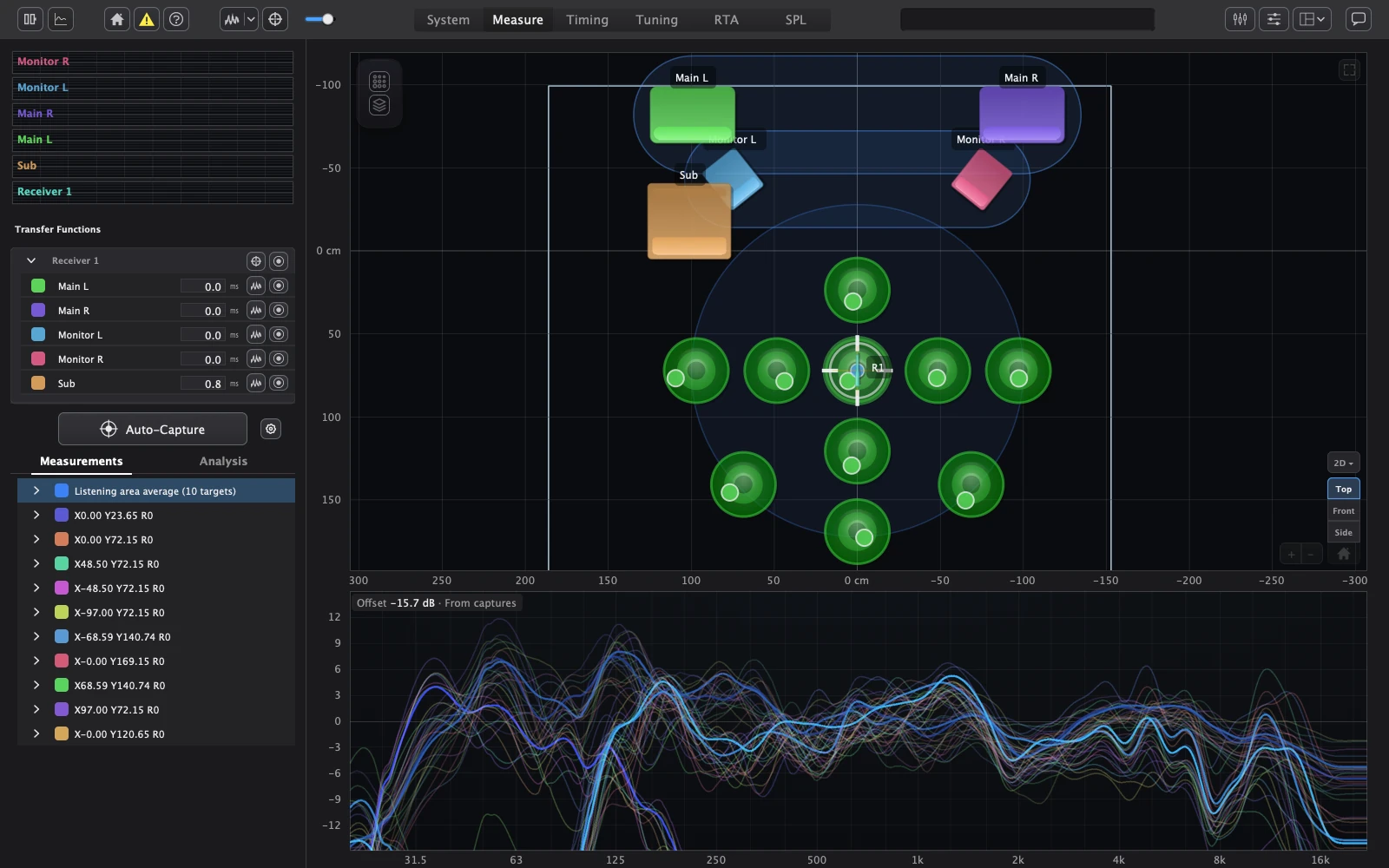
Auto-capture guides you around the coverage area. Walk the mic to each target and hold still, and it captures. You can also capture or skip any target yourself, and pause and resume the run at any time. Every position adds to one picture of the room. You can measure with sweeps or pink noise. A capture that goes wrong is repeated, and a noisy one is flagged, so the average you correct to is built from clean data.
The live transfer function
The live transfer function is an H1 estimate: the cross-spectrum and the reference auto-spectrum are averaged first, then divided.
Why this matters: noise at the microphone that is uncorrelated with the reference averages out of , so it doesn't push the magnitude up. The obvious alternative, averaging the ratio |Y|/|X| frame by frame, counts noise as signal, so in a busy room every region of low coherence reads high. That's the difference between a response you can correct to and one that tells you to cut frequencies that were only noise.
Coherence is computed alongside. It says, frequency by frequency, how much of what the microphone heard was caused by the reference. Most of the reliability decisions later in this article are built on it: which captures to trust, where a speaker's usable band ends, where a crossover can go, and when to refuse an alignment.
- Frames and averaging. Hann-windowed frames overlap heavily, so no part of the signal is lost at a window edge. They're averaged over a number of frames you set, or with an exponential average whose time constant you set. More averaging means a steadier trace that responds more slowly.
- Reference alignment. The reference must be delayed to line up with the sound arriving at the mic, or the cross-spectrum decorrelates and the trace falls apart at high frequencies. The delay is found with GCC-PHAT and applied as a fractional delay, so it isn't limited to whole samples. Changing that delay rotates the running average rather than restarting it, so you don't lose the averaging you've built up.
Resolution
FFT sizes run from 128 to 131,072 points. A longer FFT resolves lower frequencies and finer detail, but takes longer to fill and needs the reference delay to fit inside it. Automatic chooses the smallest size whose usable window covers the longest source-to-microphone flight time plus the interface latency: long enough to hold the arrival, no longer than it needs to be.
A single FFT size is a compromise across the band: fine enough for the bass is needlessly fine for the treble. Multi-resolution analysis avoids that. It analyses the signal in octave stages, decimating the signal for each lower stage, so every octave gets roughly the same resolution relative to its frequency. The stages are joined with smooth crossfades on a log-frequency grid, and the top stages average more frames because their frames are shorter, which keeps their variance in line with the rest.
Sweeps
Sweep captures use an exponential (Farina) sweep. Its time-reversed, amplitude-compensated inverse filter turns the recording into an impulse response, and harmonic distortion lands at negative time, where it can be discarded instead of contaminating the response.
- Regularised division. The stored transfer function divides the recording by the sweep with a small regularisation term, so frequencies where the sweep had almost no energy don't blow up into noise.
- Windowing. The impulse response is kept from the direct sound to the point where it has decayed into the noise, plus a margin. Too short a window cuts off room energy that's really there; too long a window adds noise that isn't.
- Averaging passes. Repeated passes are averaged as complex transfer functions after each is aligned to its own direct sound. Averaging them without that step would let tiny timing jitter between passes cancel the high frequencies, which shows up as a false treble roll-off.
- Subs use a longer fixed analysis length, for the same reason as their longer stimulus.
Smoothing
Display smoothing is fractional-octave, from 1/48 to 1 octave, plus variable and psychoacoustic options, with magnitude and phase smoothed separately. The correction fit uses its own, coarser smoothing, chosen so the fit follows features the ear hears as tone rather than every narrow peak and dip, which tend to move as you move.
What excess phase shows
The phase plot can show excess phase: what remains of the phase response once the minimum-phase part implied by the magnitude is taken away. That remainder is the part an ordinary EQ can't fix, so it shows you what a phase correction would actually address.
3. Aligning: delay, polarity and crossovers
What happens
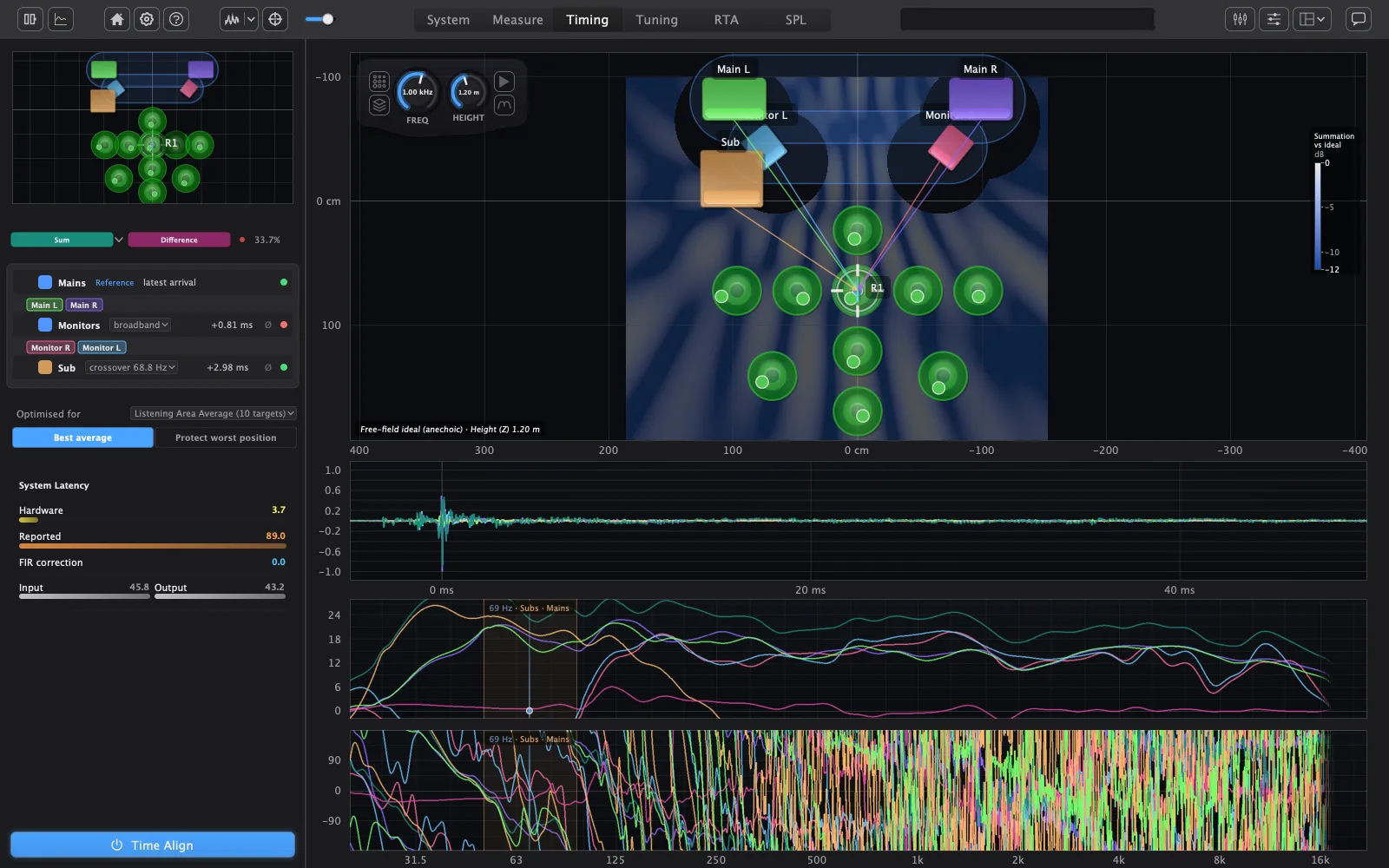
The Timing tab sets each speaker's delay and polarity so their sound arrives together where you listen. It shows magnitude, phase and impulse plots of the response as it plays. AudioMap aligns everything to the speaker whose sound arrives last, so no speaker needs a negative delay; a sub can be that reference. Full-range speakers are aligned across the whole band, and subs are aligned to their tops around the crossover, where the two actually overlap.
A new alignment takes effect as soon as it is solved. You can override any delay or polarity yourself, and hand it back to the solver later. Stage or studio monitors can be left out of the alignment.
What alignment optimises
Alignment is about cancellation. Two speakers playing the same frequency add up when they arrive in phase and cancel when they arrive out of phase. AudioMap's measure of a candidate alignment is how much energy is lost to cancellation where the speakers overlap: at each frequency, at each measured position, it compares what the speakers would deliver if they added perfectly with what they actually deliver as they combine, with each speaker's delay, polarity, crossover and high- and low-pass filters included.
Three choices shape that measure:
- Only shared energy counts. At a frequency where one speaker is far louder than the others, nothing it does with its delay can cause much cancellation, and nothing it can do will fix much either. So each frequency is weighted by how much of its energy is shared between speakers. Without that weighting, the search would spend its effort on frequencies that don't matter and ignore the crossover region, which does.
- Every octave counts equally. A linear frequency axis has far more points in the top octave than the bottom one, so an unweighted sum would let the treble outvote everything else. Weighting by octave puts the bass, where alignment matters most, on an equal footing.
- No single null dominates. A deep cancellation at one frequency is capped in how much it contributes, so one null can't outweigh a good result everywhere else.
The EQ correction is not part of the search. It's fitted to the aligned result afterwards, because correcting a response that's still going to change wastes the correction.
Several positions
With more than one measured position, you choose what the search optimises:
- Best average minimises the average loss over your positions: the best result for the room as a whole.
- Protect worst minimises the loss at the worst position: no seat is sacrificed so that the others gain.
The search starts from the solver's own estimate and moves one speaker or group at a time. A move is accepted only when its improvement is clearly larger than its variation from position to position, so the result reflects the measurements rather than noise. Without that test, near-equal answers would flicker from one solve to the next. The delays already playing get no preference: the result depends only on the measurements and your settings, with one exception for subs, below.
Finding candidate delays
- Start from the wavefront. Each speaker's arrival is first estimated from the rising edge of its band-limited impulse response. The rising edge, not the peak, because the peak of a band-limited response lags the true arrival and moves with the filters.
- Search near it. Where that arrival can be measured, the delay search is confined to a window around it, as wide as the arrival estimate's own uncertainty: tight for a speaker with a clean, broadband onset, wider for a band-limited one. That keeps the answer consistent with the physical wavefront. Without it, the search can find a delay that scores slightly better on paper but is a whole cycle out, which sounds wrong off-axis and away from the measured positions.
- Coarse, then fine. Inside the window, a coarse search finds the right region and a fine search settles the exact delay. It's far faster than searching finely everywhere, and gives the same answer.
- Both polarities. Every speaker is tried at both polarities. With a few speakers, every combination is tried; with many, the search proceeds greedily, because every combination becomes too slow.
- Settle. Speakers are revisited in turn until no single change lowers the loss.
Everything is aligned to the speaker whose sound arrives last, including its filter delay, so no speaker needs a negative delay. Speakers that play the same band in a group move as one unit, so a stereo pair stays a pair.
Subs and the cycle question
Around a crossover, a sub can line up with its tops at more than one delay, one period apart. Each candidate makes the two meet in phase at the crossover frequency; they differ in how well they hold together either side of it, and in how late the sub's sound arrives.
AudioMap judges those candidates only on the energy where the sub and tops actually overlap: frequencies where both are playing at comparable level. Outside that region, a sub's delay can't cause or cure cancellation, so including it only adds noise to the decision. When several cycles fit about equally well on energy, the one whose phase is most consistent across your positions wins, because a cycle that only works at one seat isn't the right one.
When a sub's arrival can't be measured, which is common, there's no wavefront to anchor the search. It then stays within one cycle of the sub's current delay. That is the one place the delay already playing affects the result, and the reason is practical: without an anchor, the search would otherwise be free to move the sub by whole cycles with nothing to say which is real. When even the phase can't separate two cycles, AudioMap refuses that relation instead of picking one.
Where the crossover goes
For each hand-off between subs and tops, AudioMap looks for the frequency where the two speakers are both measured cleanly and overlap well.
- Where it searches. Only between the upper speaker's measured low edge and the lower speaker's measured high edge: the range where one is rolling off and the other is still in its passband. A speaker's edges are the points where its usable band, after smoothing and with good coherence, has fallen off. Outside that range, at least one speaker isn't really playing.
- How it scores. Each frequency in that range scores on two things: how coherent both speakers are there, and how close they are in level. Coherence because a crossover placed where either measurement is unreliable is placed on guesswork. Level because a crossover where one speaker is much quieter needs a large gain change to work, and the score falls off steadily the further apart they are.
- When it's close. When several frequencies score about equally, it takes the one nearest the middle of the overlap, which leaves the most room either side for the filter slopes. A wide, flat-topped score is flagged as low confidence, because then the data doesn't really prefer one frequency.
- Phase is not part of it. The alignment handles phase. Scoring it here as well would let the crossover chase a phase problem the delay should fix.
There's no suggestion when an edge wasn't measured, when the speakers don't overlap, or when both speakers are full-range.
You choose the filter: Linkwitz–Riley, Butterworth or Bessel, from 12 to 48 dB per octave (Linkwitz–Riley in 12 dB steps), either shared between the two sides or set separately. The sub's level is matched to the speakers it crosses over to, and the predicted sum is drawn before and after, including each speaker's delay, polarity and level, so you can judge it before you commit.
In the example
The Mains arrive last, including their filter delay, so they are the reference:
| Unit | Delay | Polarity | Judged over |
|---|---|---|---|
| Mains | 0 (reference) | normal | — |
| Monitors | 39 samples = 0.81 ms | normal | broadband |
| Sub | 147 samples = 3.06 ms | normal | the crossover overlap |
The monitors sit about 44 cm closer to the listening position than the mains (tapes of 126 cm and 170 cm), which is 1.28 ms of path. The alignment chose 0.81 ms. That's expected: the alignment matches phase where the speakers' outputs combine, including each unit's high-pass filter and driver phase. It doesn't match path length.
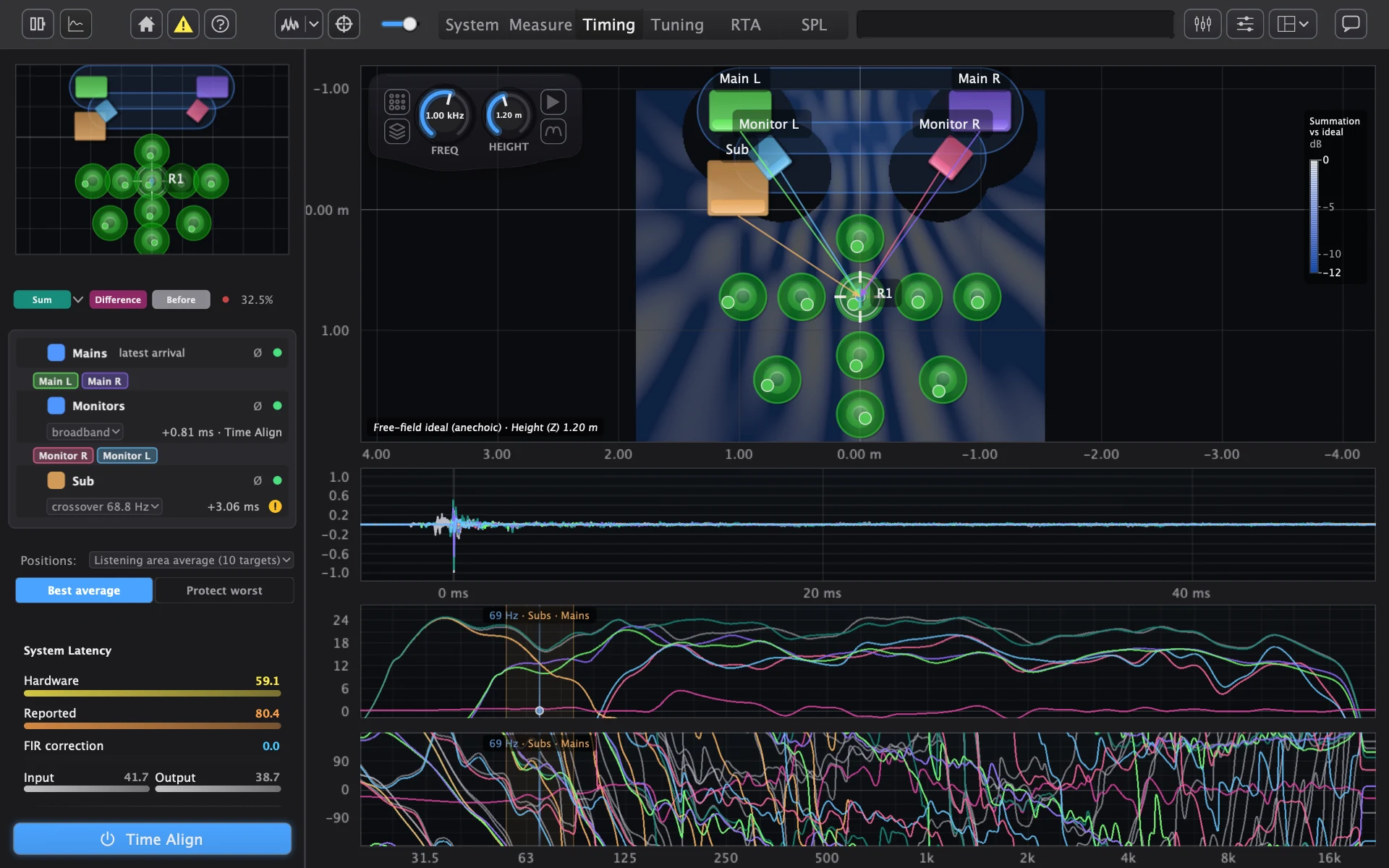
The chosen alignment wasn't the lowest-loss candidate the search scored, and why shows both safeguards at work:
| Candidate | Average loss over 10 positions | Result |
|---|---|---|
| Monitors early, inverted | 1.01 dB | Outside the window allowed by the monitors' measured arrival: rejected |
| Monitors at +39 samples, inverted | 1.18 dB | Not clearly better: the gain was smaller than its variation between positions |
| Monitors at +39 samples, normal | 1.43 dB | Chosen |
The first candidate scored best but would have placed the monitors' sound earlier than it physically arrives: the wavefront window ruled it out. The second was inside the window, but its improvement, measured on the energy the monitors share with the rest of the system, varied between positions by more than its size, so it couldn't be told apart from measurement noise. The polarity stayed normal. The chosen alignment happens to match what this project was already playing. That is a coincidence of the data, not a preference.
The sub had no measurable arrival in this recording, so its search stayed within one cycle of its current delay. It found seven delay candidates, one period apart, that fit about equally well on energy; the phase consistency across positions picked +147 samples, and normal polarity was favoured by 4.5 dB.
For the crossover, the measured usable bands were:
| Unit | Low edge | High edge |
|---|---|---|
| Sub | 27.0 Hz | 95.3 Hz |
| Mains | 47.8 Hz | not measured (open) |
| Monitors | 117.7 Hz | 15.3 kHz |
The sub and mains overlap from 47.8 to 95.3 Hz, and AudioMap suggested 67.4 Hz, close to the middle of that overlap on a log scale; the user set 68.8 Hz. The sub and monitors don't overlap at all: their bands leave a gap from 95.3 to 117.7 Hz, which the mains fill, so no crossover is suggested between those two.
4. Correcting: fitting the EQ
What happens
AudioMap fits EQ to the measured response so it reaches your target, within the frequency range you set for each speaker. You choose the tonal balance it aims for: a simple tilt, separate bass and treble, or a Harman-style in-room curve.
- Per speaker or per group. Correct each speaker on its own, or fit one correction to a group as it sounds when all its speakers play together, time-aligned, and apply it to every member.
- Which positions count. Fit to the average of the listening area or the coverage area, or to one measured position. Positions can count equally, or by how much energy they receive.
- Full range or split EQ. Run the EQ on each speaker's whole signal, or confine it to the speaker's own band so it doesn't fight the crossover. The split is all-pass compensated, so it sums flat in level, with some phase shift around the band limits; full range adds no phase shift.
- Speaker linearisation. Optionally correct the speaker's own response, measured up close, separately from the room.
- Levels. AudioMap matches speaker levels for you and shows how each level is made up: its setup level, the automatic match and your trim.
How the EQ is fitted
By a greedy, iterative band placer working on the residual in dB.
- Prepare. The measured response is brought to 0 dB over the speaker's measured passband, smoothed, and inverted to the correction it needs.
- Find the worst feature. AudioMap finds the residual's peaks and dips and scores each one on how deep it is, how wide it is and where it sits in frequency, so a broad, audible feature outranks a narrow one of the same depth.
- Place one band. It places one peaking filter (an RBJ cookbook biquad) on the best-scoring feature. The band's Q comes from the width of the feature it corrects, Q = f / bandwidth, so the filter matches the shape of the problem rather than a fixed preset.
- Repeat. The band's effect is subtracted from the residual, and the search runs again. A new feature close to an existing band re-tunes that band instead of adding another, so bands don't pile up on top of each other.
Why greedy rather than a global optimiser: each band corrects something you can point to on the plot, the result is predictable when you change a setting, and the fit stops when what's left isn't worth a band.
The fit works within limits, each with a reason:
- A band count. A default number of bands, which you can raise. More bands follow the measurement more closely, but past a point they're fitting features that move when you move.
- A Q ceiling. Very narrow bands correct features that exist at one point in the room and nowhere else. A ceiling keeps the correction to features broad enough to be real.
- Gain limits. Cuts and boosts are bounded. Boosts cost headroom and amplifier power, and a large boost into a dip usually means the dip isn't a tonal problem at all.
- A tighter boost limit for subs. Sub boosts are much more limited than sub cuts. Low-frequency boost costs the most excursion and power, and sub dips are the most likely to be cancellations that boosting can't fill.
- A default frequency range, which you can change per speaker.
- A minimum worth correcting. A residual smaller than a small threshold doesn't get a band, so the fit stops instead of chasing differences you can't hear.
Respecting the crossovers
The engaged high- and low-pass filters bound where bands can go, and differently for cuts and boosts. A cut may reach a little way down a filter's slope, where it can still tidy the overlap. A boost has to keep its whole lower skirt above the point where the slope begins in earnest, so EQ never fights the crossover by boosting into its roll-off: that would undo the crossover, cost headroom, and move the sum the alignment was solved for. On an edge without a filter, boosts stay inside the speaker's measured band, because boosting beyond what a speaker can reproduce only adds distortion.
Positions and groups
- Equal per position (the default). Each position is brought towards the typical level of the set before averaging, so one hot seat close to a speaker can't dominate the result. The lift is limited, and a position far below the rest is left out altogether, because a position that quiet is far more likely to be noisy or badly placed than representative.
- Energy weighted. A plain power average with no normalisation, so positions receiving more sound count for more.
- Group correction. A group's response is the complex sum of its members at each position, with each member's live delay and polarity: , where is the delay and the polarity. One correction is fitted to that sum and applied to every member. That's why group correction follows the alignment: change a delay and the sum it was fitted to changes too.
The target
By default the target curve is a separate filter after the EQ: the fit corrects the speaker to flat, and the target shapes the tone on top. Keeping them separate means you can change the target without refitting, and the bands describe the speaker and room rather than your taste. You can fold the target into the fit instead.
With Split EQ routing, the band EQ runs only on the speaker's own band, and the low and high remainders are compensated so the three paths sum flat in level, at the cost of phase shift around the band limits. Full range runs the bands in series and adds no phase shift.
In the example
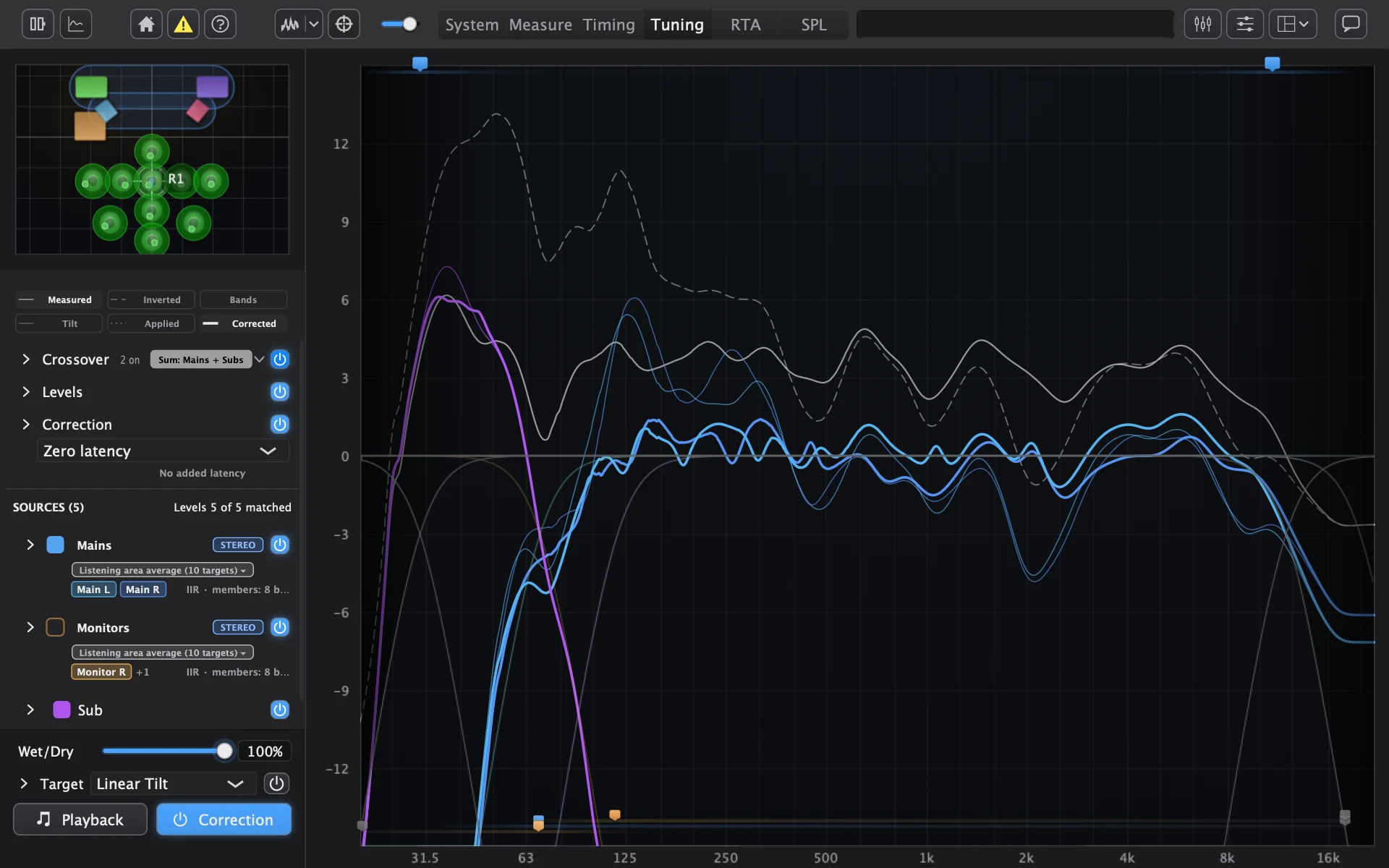
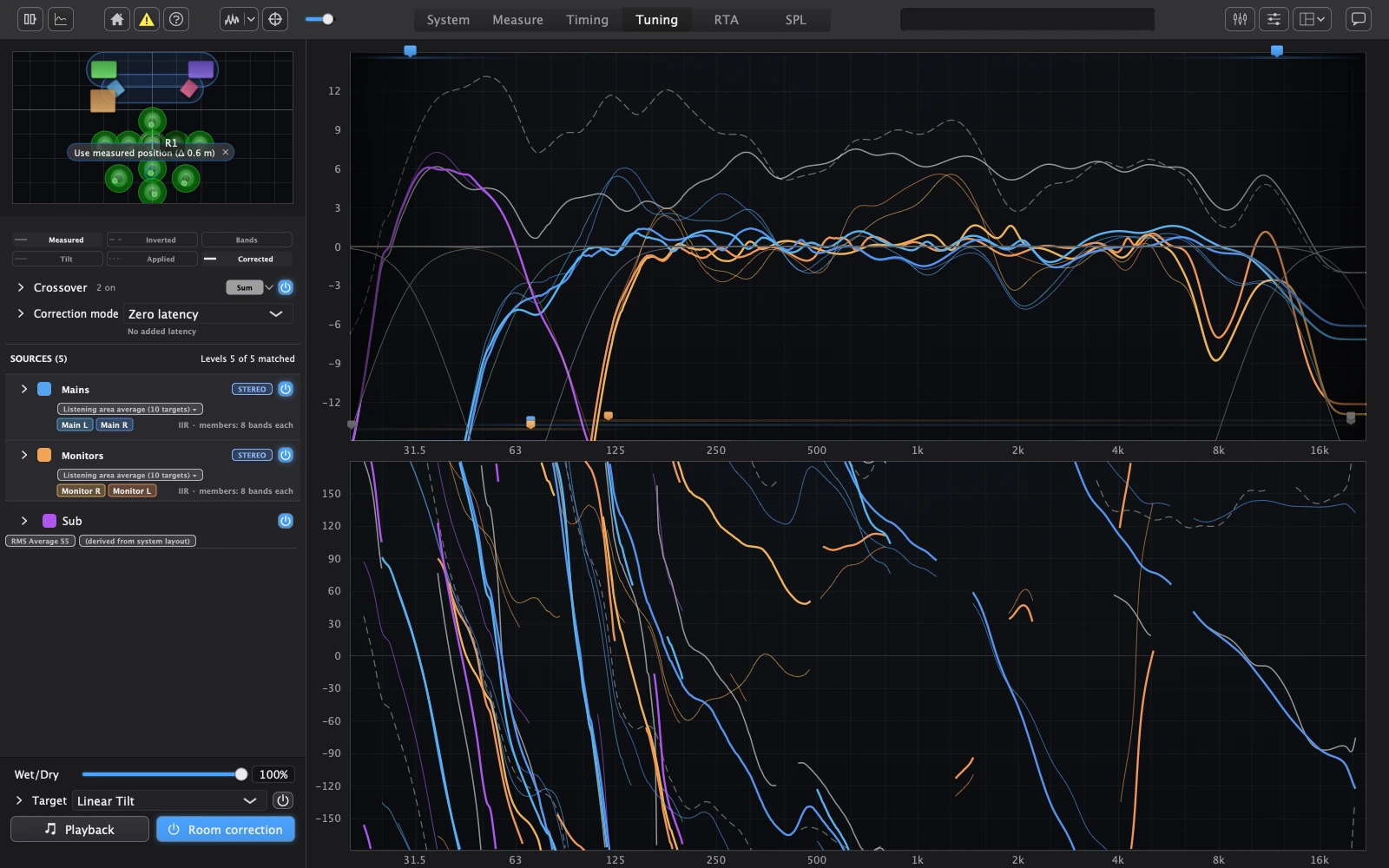
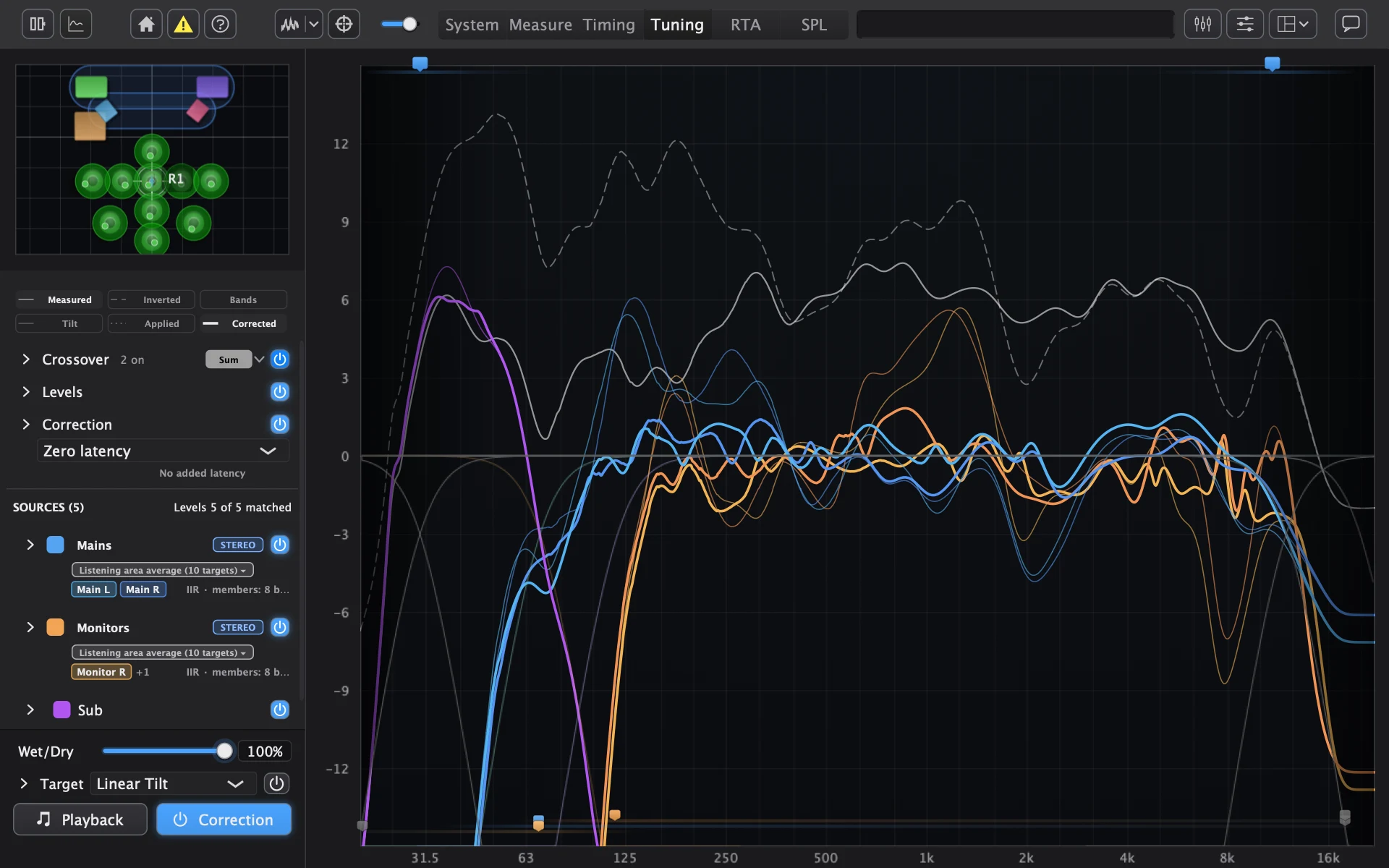
The two figures show the same Tuning view fitted two ways. In the first, the Mains and Monitors are fitted to the listening position alone; in the second, every group is fitted to the average of the 10 positions. The thin traces are what was measured, the bold traces are what the correction delivers, and the white trace is the predicted sum of all speakers, dashed before correction and crossovers and solid after.
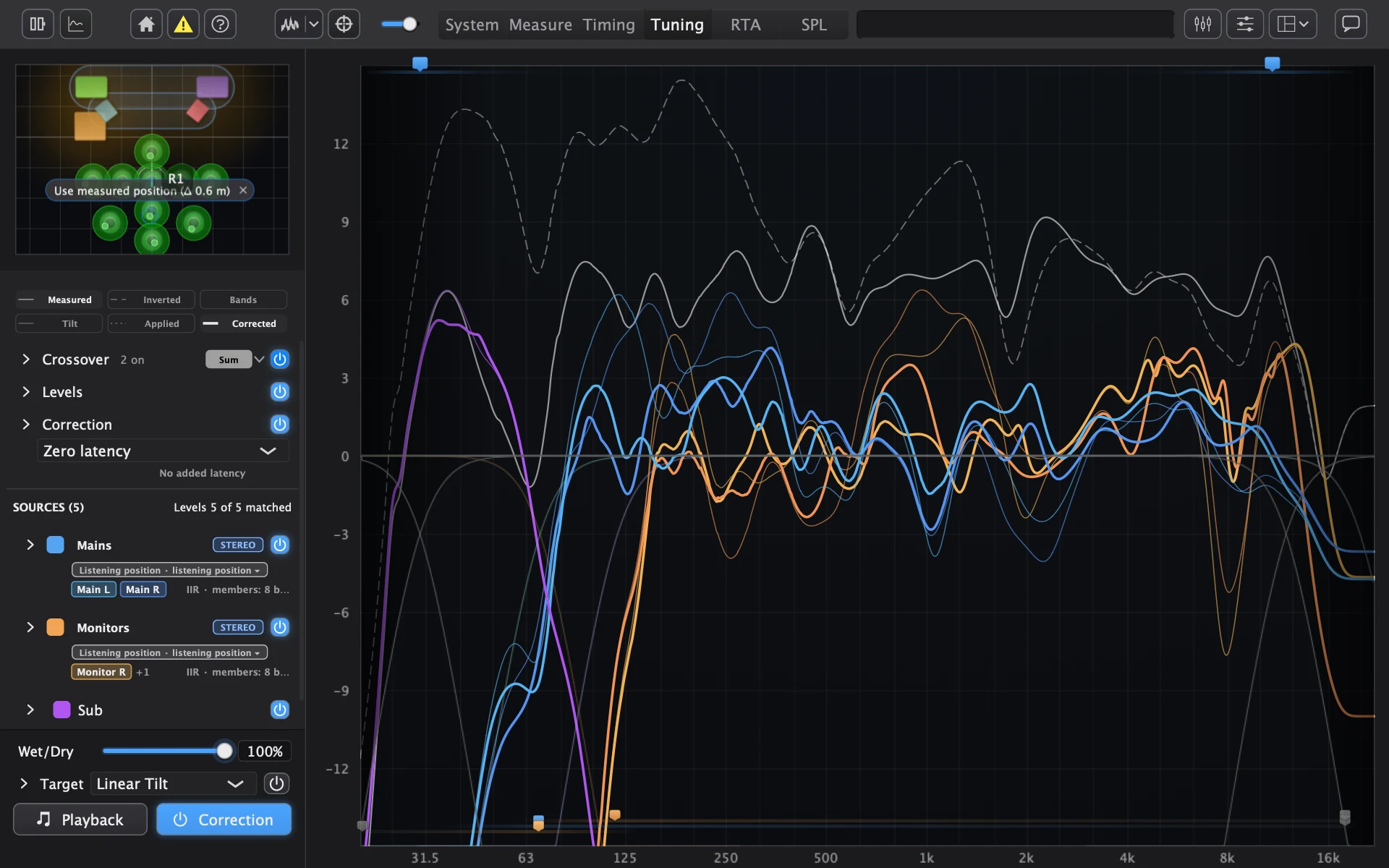
5. Playing the correction: modes and where they run
Which correction mode
Every mode applies the same tonal correction. They differ in what happens to phase and how much delay they add, and one mode plays for the whole sound system.
| Mode | What it does | Added delay |
|---|---|---|
| Zero latency | Conventional minimum-phase EQ | None |
| Minimum phase | The same minimum-phase correction, built as one long FIR filter | None |
| Linear phase | Corrects the tone without adding any phase shift of its own, so it doesn't smear timing | About 85 ms at 48 kHz |
| Mixed phase | Minimum phase in the low end, where a linear-phase filter's pre-ringing is easiest to hear, and linear phase above | Same as Linear phase |
| Excess phase only | Corrects the tone with EQ, and uses an FIR filter to correct the part of the phase EQ can't, where the measurement is reliable | Same as Linear phase |
Zero latency and Minimum phase suit live work. In the modes that add delay, every speaker carries the same delay, so the alignment is kept. The same mode plays in AudioMap, AudioMap Control and the plugin.
How the FIR modes are built
Every mode realises the same magnitude: the EQ the fit produced, never the raw inverse of the measurement. That's deliberate. The raw inverse would try to undo every narrow peak and dip at the measured positions, including the ones that move when you move; the fitted EQ has already decided which features are worth correcting. On each speaker's own path, crossovers, delay, gain and polarity stay outside the FIR, so changing them doesn't mean redesigning the filter.
- Minimum phase reconstructs the minimum-phase filter from the magnitude cepstrally: the same tone as the IIR bands, as one long filter, with no added delay.
- Linear phase is a symmetric FIR built from the magnitude and windowed to keep its frequency response clean. A symmetric filter's delay is half its length, which is where the added delay comes from. The length is a trade-off: longer resolves lower frequencies more accurately; shorter adds less delay.
- Mixed phase exists because of pre-ringing. A sharp peaking band rings for a time that grows as its frequency falls and its Q rises. A linear-phase filter mirrors that ringing ahead of the sound it belongs to, where it's audible unless the ear's temporal pre-masking hides it, and pre-masking only lasts a short time. So Mixed plays minimum phase below a low crossover, chosen from the fit's sharpest permitted band and the length of pre-masking so that pre-ringing stays inaudible, and linear phase above it. The two blend smoothly over a band rather than switching at a point. The crossover point is adjustable.
- Excess phase only treats the measured response as a minimum-phase part times an excess-phase part. The IIR EQ keeps correcting the magnitude, and a unit-magnitude FIR corrects the excess phase: the measured phase minus the minimum phase implied by the magnitude, computed cepstrally. Before correcting, it removes the part a delay or a polarity flip would account for, because those are the alignment's job, and an all-pass filter can't advance sound in time anyway. The phase correction is applied only across the band where the speaker was measured reliably, fading in and out at the edges so the filter doesn't ring. A speaker without a reliable band plays the bulk delay alone, so it stays aligned.
Where it plays
The correction plays in three places, and all three play the same correction.
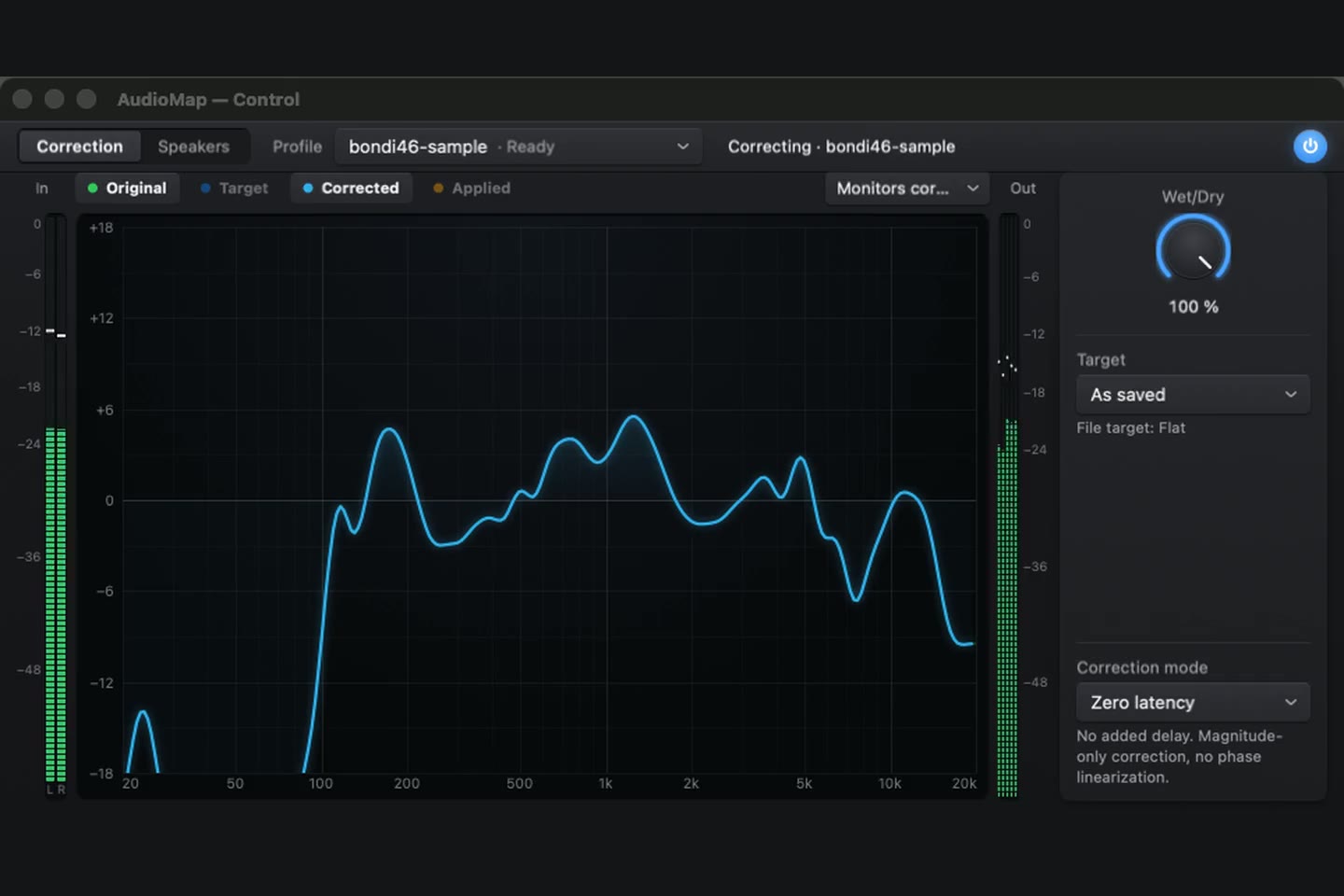
- AudioMap Bridge is the audio device that carries your Mac's sound through the correction to your speakers. AudioMap Control, in the menu bar, turns it on for everything your Mac plays, follows the project open in AudioMap, and keeps correcting after AudioMap closes. Its window shows the same traces as the Tuning tab, and a target or tilt change made in Control carries back to the open project. Switching Correction off bypasses the EQ but keeps crossovers, alignment, polarity and levels playing, with no change in latency.
- AudioMap Plugin 2.0 (AU and VST®3) plays a project's full correction in your DAW, including each speaker's delay, level, polarity and correction mode, and reports its latency so the DAW can compensate. Each instance plays one stereo pair or one speaker, and linked instances stay in step.
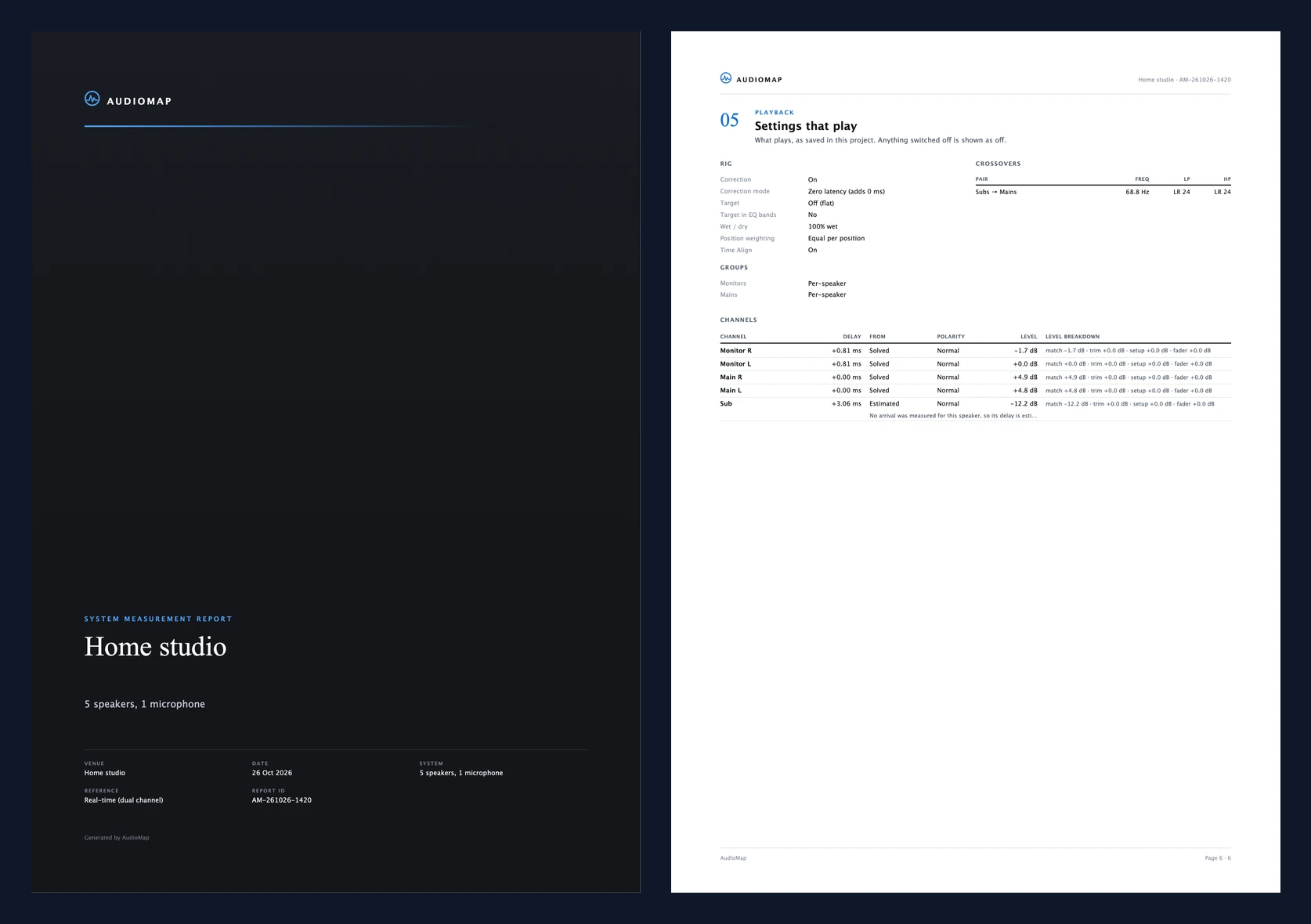
- Your processor. Export to miniDSP (including FIR filters, with a check that it fits your model), to d&b, Q-SYS, Powersoft and Linea (including a network push that previews the change before sending), or as REW filter settings, a generic EQ list or an impulse response. A saved correction profile carries the target, filters, delays, levels, polarity, crossovers and correction mode, and a PDF report records everything that is playing, each speaker's EQ and the room's acoustic measurements.
6. Reading the room: reflections, surfaces and acoustics
What happens
Carried over from AudioMap 1: each sweep measurement's impulse response has its early reflections marked. From their arrival times at several known speaker and microphone positions, AudioMap estimates where the walls, floor and ceiling are, with how certain it is about each and how absorbent each appears per octave band. The surfaces are drawn on the Measure tab's spatial plot, and in AudioMap 2 they can also shape the heatmap.
Reverberation time and clarity are measured per octave band from your own captures, and room modes are marked on the response, so you can see which low-frequency peaks the room itself is causing rather than the speaker.
Finding reflections
From each sweep's impulse response, measured with one omni microphone, AudioMap takes the Hilbert envelope, which follows the energy of the response without its oscillation, and anchors time zero on the direct sound. It then picks the envelope peaks that look like real reflections:
- Prominent. A peak has to stand clearly out of the envelope around it, or it's just the texture of the decay.
- Not too far down. A peak too far below the direct sound is more likely noise than a surface.
- Separated. Two peaks too close together are treated as one, because the measurement can't tell them apart reliably.
A limited number of reflections is kept per response, always including the earliest ones after the direct sound, because the first reflections carry the clearest geometric information. Each is timed to below one sample.
Placing the surfaces
By timing, at known positions. AudioMap does not measure the direction a reflection arrives from: one omni microphone can't. Instead, every reflection arrival at a known speaker and microphone position constrains where a reflecting plane can be. One arrival allows many planes; across enough positions, only one room fits all of them.
- The forward model is the image-source method (Allen and Berkley, 1979): each candidate surface mirrors the speaker, and the reflection is predicted to arrive after the direct sound by the extra path divided by the speed of sound. First- and second-order paths are both predicted. Recovering room geometry from echo timing at known positions follows published work such as Dokmanić et al., "Acoustic echoes reveal room shape" (PNAS, 2013).
- Scoring a candidate room. A candidate room scores well when its predicted reflections arrive when the measured ones did, with weaker credit for matching levels, and it's penalised both for measured reflections it can't explain and for predicted reflections that weren't measured. Both penalties matter: without the first, a room with too few surfaces looks fine; without the second, a room with surfaces everywhere does.
- The search. The best room starts from a geometric first guess and is refined by a local search, restarted from different points and allowed to jump, so it doesn't settle in the first plausible room it finds. The default model is a box aligned to the floor, with sensible priors such as walls not passing through microphones.
- Uncertainty. Each surface gets an uncertainty from how sharply the fit depends on it: a surface the data pins down tightly is confident, one that could move without changing the fit much isn't. Surfaces AudioMap isn't confident about are flagged, and left out of the heatmap.
Absorption
Each surface stores a complex reflection coefficient R(f) per octave band, not just an absorption figure, so the heatmap can use the reflection's phase as well as its level. Absorption follows as α = 1 − |R|². |R| comes from the reflection's level relative to the direct sound, corrected for the extra distance it travelled and for the speaker's directivity in that direction, since a speaker sends less energy off-axis towards a side wall than straight ahead. A band is only estimated where the reflection is coherent and clear of the noise. Each reflection is analysed in a short window that ends before the next one arrives, so neighbours don't contaminate each other, and that short window is why the lowest octave bands are often left unresolved.
Reverberation and clarity
Following ISO 3382, per octave band:
- Decay curve. Schroeder backward integration of each band-filtered impulse response gives a smooth decay curve, with Lundeby's method finding where the decay meets the noise floor and compensating the truncated tail. Without that, the noise floor flattens the end of the curve and the reverberation time reads long.
- Reverberation times. EDT, T20 and T30, each fitted over the standard's evaluation range. T30 is only reported when there's enough clean decay to fit it; otherwise T20. A fit is only marked reliable when the decay is close to a straight line, because a curved decay means more than one process is decaying.
- Clarity and definition. C50, C80 and D50, computed only when the response is long enough to contain real late energy.
- Distance. Captures made closer to the source than the standard's minimum distance are excluded, because there the direct sound dominates and the room's decay is under-read. That distance depends on the room's volume and reverberation time, which AudioMap estimates.
7. Predicting coverage: the heatmap
What happens
The heatmap predicts how sound covers the room at any frequency, as a slice through the plan or in 3D. Near your microphones the prediction is pulled toward what was actually measured, and shading shows where it is estimated rather than measured.
How it works
It is a physical model fitted to your measurements, not drawn from a catalogue. Each speaker's strength at the chosen frequency is fitted by least squares from the measured complex pressures at your microphone positions, given how far each microphone is from each speaker. Fitting it from your measurements, rather than taking it from a data sheet, means the model already includes your amplifier gains, your levels and your room's average effect.
The field is then the coherent complex sum, at that frequency, of every speaker's direct sound, scaled by its measured horizontal directivity around the full circle, by its spreading (1/r for point sources, 1/√r for line sources) and by air absorption. Being a coherent sum, it shows interference: the comb filtering and cancellation between speakers that a power sum would hide. That's the point of drawing it, since interference is what makes one seat sound different from the next.
It can also include reflections from the detected surfaces, each weighted by how absorbent that surface appears to be. That option is off by default, because a simple reflection model can overstate interference patterns at high frequencies. Surfaces AudioMap isn't confident about are left out.
Blending towards the measurements
A model is only as good as its assumptions, and near your microphones you know better. So the difference between measured and predicted at each microphone is interpolated across the room with a Gaussian process whose spatial correlation matches a diffuse sound field. Each microphone is trusted according to its coherence, so a noisy capture pulls the field less than a clean one. The correction has full effect close to a microphone and fades out over a distance that scales with wavelength, because a measurement says less about a point the further away it is in wavelengths.
The example, end to end
| Stage | What AudioMap did on the desk system |
|---|---|
| Finding the speakers | Layout fitted to eight distances, seven of them tapes; largest residual 6.3 cm, the rest 3.3 cm or less. One impossible sub reading (5.6 m) rejected. Two speaker pairs still disagree end to end, unexplained. |
| Measuring | 10 positions around the listening position, sweeps at 48 kHz. |
| Alignment | Mains are the reference. Monitors +0.81 ms, normal polarity, broadband. Sub +3.06 ms, normal polarity, at the crossover. Two lower-scoring candidates were declined: one outside the measured wavefront, one not clearly better across positions. |
| Crossover | Sub and mains overlap 47.8–95.3 Hz; suggested 67.4 Hz, set to 68.8 Hz. No crossover between sub and monitors: the mains fill the gap. |
| Correction | Fitted to the listening position and to the 10-position average (figures 1 and 2): bold corrected traces and the solid sum compared with the thin measured traces and the dashed sum. |