
Revolutionise Your System Tuning
Professional software for measuring, visualizing, and perfecting sound system performance with unmatched accuracy and intuitive tools.
Complete Toolkit for Modern Sound Engineers
Unparalleled Capabilities
AudioMap combines advanced analysis with intuitive controls to give you unprecedented insight into your audio systems.
REAL-TIME ANALYSIS
See sound instantly
Visualize your audio system's performance instantly with our advanced RTA (Real Time Analyzer). Monitor frequency response, phase alignment, and impulse response in real-time as you make adjustments.
- High-resolution spectral analysis with adjustable FFT size
- Multiple visualization modes: RTA and live spectrogram
- Peak hold and averaging with customizable times
INTUITIVE TIMING ALIGNMENT
Perfect sync, every time
Effortlessly synchronize multiple audio sources and receivers with pinpoint accuracy. Our timing tools help you eliminate phase cancellation and ensure coherent sound throughout your venue.
- Visual delay finder with microsecond precision
- Phase correlation analysis for perfect alignment
- Group delay visualization and correction
SPATIAL MAPPING
Sound made visible
Experience your sound environment like never before with our innovative Location view. Map how sound propagates through your space to identify problem areas and optimize speaker placement.
- Interactive modeling of sound distribution
- Frequency-dependent coverage mapping
- Reflection analysis and first-arrival identification
PRECISION MEASUREMENTS
Dual-channel measurement
Capture, compare, and analyze measurements with dual-channel FFT analysis.
- Dual-channel FFT analysis with coherence display
- Transfer function measurements with high SNR
- Measurement sets with intelligent averaging
INTELLIGENT TUNING
Smart tuning perfected
Optimize your system's frequency response with our smart EQ and filter tools. Our intelligent algorithms suggest optimal settings while giving you complete control over the final sound.
- Target curve optimization with customizable presets
- Automatic feedback detection and suppression
- Phase-coherent filter design and modeling
FLEXIBLE SETUP
Works with everything
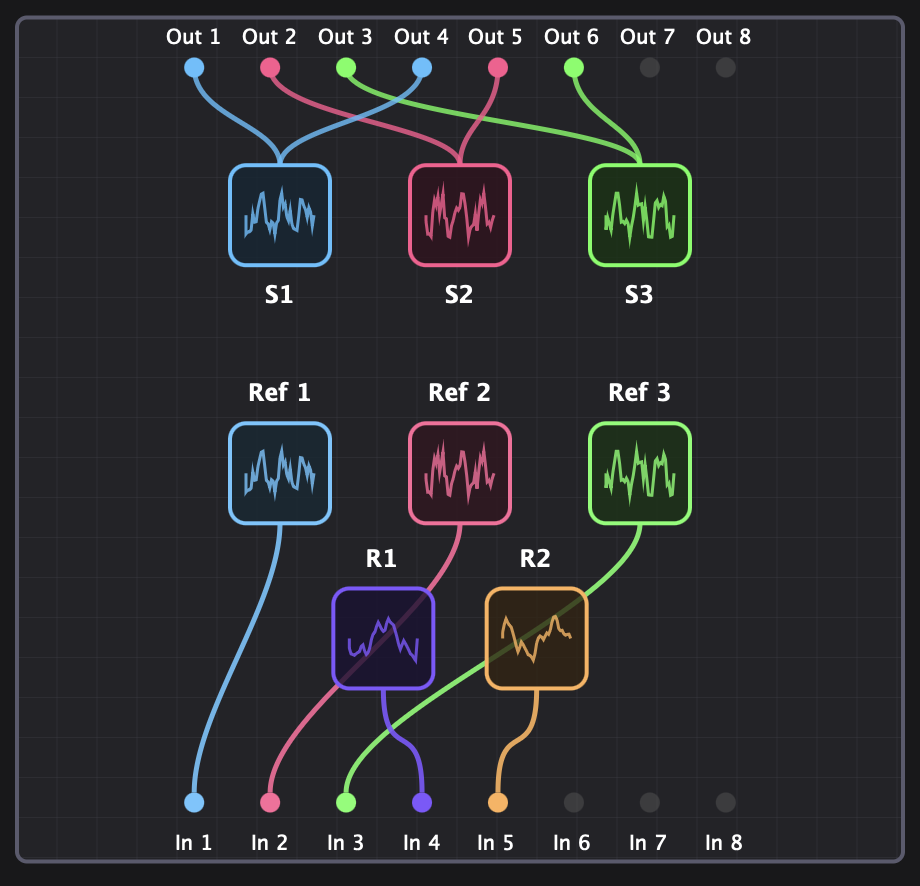
Adapt to any audio configuration with customizable channel routing and device settings. Whether you're working with stereo systems or complex multi-channel arrays, AudioMap scales to your needs.
- Support for all major audio interfaces
- Multi-channel routing and configuration
- Custom test signal generation
PROFESSIONAL SPL METERING
Stay compliant, stay safe
Monitor sound pressure levels with calibrated, standards-compliant meters. Perfect for live sound compliance, venue monitoring, and acoustic measurement with professional-grade accuracy.
- A/C/Z weighting with Fast, Slow and Leq
- A, C, and Z (flat) frequency weighting curves
- Fast, Slow, and Leq time-weighted averaging
DAW PLUGIN INTEGRATION
From measurement to mix
Apply your AudioMap corrections directly in your DAW workflow. The AudioMapPlugin brings professional DSP processing to your production environment, seamlessly integrating measurement-based corrections into any project.
- VST3 and AU plugin formats for all major DAWs
- Apply corrections generated in AudioMap to any audio
- Real-time DSP processing with minimal latency




REAL-TIME ANALYSIS
See sound instantly
Visualize your audio system's performance instantly with our advanced RTA (Real Time Analyzer). Monitor frequency response, phase alignment, and impulse response in real-time as you make adjustments.
- High-resolution spectral analysis with adjustable FFT size
- Multiple visualization modes: RTA and live spectrogram
- Peak hold and averaging with customizable times
INTUITIVE TIMING ALIGNMENT
Perfect sync, every time
Effortlessly synchronize multiple audio sources and receivers with pinpoint accuracy. Our timing tools help you eliminate phase cancellation and ensure coherent sound throughout your venue.
- Visual delay finder with microsecond precision
- Phase correlation analysis for perfect alignment
- Group delay visualization and correction
SPATIAL MAPPING
Sound made visible
Experience your sound environment like never before with our innovative Location view. Map how sound propagates through your space to identify problem areas and optimize speaker placement.
- Interactive modeling of sound distribution
- Frequency-dependent coverage mapping
- Reflection analysis and first-arrival identification
PRECISION MEASUREMENTS
Dual-channel measurement
Capture, compare, and analyze measurements with dual-channel FFT analysis.
- Dual-channel FFT analysis with coherence display
- Transfer function measurements with high SNR
- Measurement sets with intelligent averaging
INTELLIGENT TUNING
Smart tuning perfected
Optimize your system's frequency response with our smart EQ and filter tools. Our intelligent algorithms suggest optimal settings while giving you complete control over the final sound.
- Target curve optimization with customizable presets
- Automatic feedback detection and suppression
- Phase-coherent filter design and modeling
FLEXIBLE SETUP
Works with everything
Adapt to any audio configuration with customizable channel routing and device settings. Whether you're working with stereo systems or complex multi-channel arrays, AudioMap scales to your needs.
- Support for all major audio interfaces
- Multi-channel routing and configuration
- Custom test signal generation
PROFESSIONAL SPL METERING
Stay compliant, stay safe
Monitor sound pressure levels with calibrated, standards-compliant meters. Perfect for live sound compliance, venue monitoring, and acoustic measurement with professional-grade accuracy.
- A/C/Z weighting with Fast, Slow and Leq
- A, C, and Z (flat) frequency weighting curves
- Fast, Slow, and Leq time-weighted averaging
DAW PLUGIN INTEGRATION
From measurement to mix
Apply your AudioMap corrections directly in your DAW workflow. The AudioMapPlugin brings professional DSP processing to your production environment, seamlessly integrating measurement-based corrections into any project.
- VST3 and AU plugin formats for all major DAWs
- Apply corrections generated in AudioMap to any audio
- Real-time DSP processing with minimal latency
Why Choose AudioMap?
Discover how AudioMap transforms audio analysis and tuning with powerful features designed for professionals.
Superior Sound Quality
Achieve balanced, clear, and impactful audio across any space with unmatched accuracy using advanced DSP algorithms.
All-in-One Solution
From initial measurement to final tuning and DAW integration, handle everything in one seamless interface.
Time-Saving Efficiency
Reduce setup and tuning time dramatically with automated workflows and intelligent analysis tools.
Intuitive Interface
Complex data visualized clearly, making decision-making faster and more informed for professionals at any level.
Deeper System Understanding
Gain unprecedented insight into your audio system's behavior with advanced measurement and analysis capabilities.
Versatile & Scalable
From small venues to large installations, live events to fixed systems, AudioMap adapts to your specific needs.
Enhanced Collaboration
Share projects, measurements, and insights easily with team members and clients for seamless workflow.
Future-Proof Investment
Stay ahead with continuous updates and a tool that evolves with industry standards and technology.
What Our Users Say
"AudioMap has transformed how we approach system tuning. It's like having a team of audio experts at your fingertips."
"The spatial mapping feature alone has saved us countless hours in optimizing speaker placement."
"Being able to visualize phase alignment in real-time has been a game-changer for our studio installations."
"The intelligent tuning features help me achieve consistent results across venues of all sizes."
Try AudioMap Pro free for 21 days
No credit card required
After your trial, keep using AudioMap Lite forever — or choose a license to unlock more.
Download Free TrialChoose Your License
One-time purchase. No subscriptions. 12 months of updates.
Lite
Transfer function, RTA, and spectrogram analysis for a single channel.
Free forever
- 1 source
- 1 receiver
- Transfer function, RTA & spectrograms
- Frequency/phase response
- SPL metering
- Project save/load
Essentials
Add tuning and Auto-EQ to your measurement workflow.
One-time payment
- Everything in Lite, plus:
- Tuning & Auto-EQ
- Target curve correction
- Filter export
- 12 months of updates
- Email support
Standard
Automated multi-source capture with spatial triangulation.
One-time payment
- Everything in Essentials, plus:
- Up to 2 sources
- Spatial auto-capture with source triangulation
- Multi-channel analysis
- Premium support
- Commercial use
Professional
The complete solution for professional audio system optimization.
One-time payment
- Everything in Standard, plus:
- Unlimited sources & receivers
- Spatial heatmapping
- Room directivity analysis
- JSON-RPC API access
- Priority support
All prices in USD. Secure payment processing. Volume licensing available, contact us for details.